How to Scrape YouTube trends and Popular Channels in 2026

How to scrape YouTube trends and popular channels
In today's world, where data is the new gold, it is important to have access to the data you need to make informed decisions. YouTube, as the world's second-largest search engine, is a repository of consumer insights, viral trends, and competitor strategies. But accessing this data at scale can be challenging.
If you have ever tried to build a dashboard for viral content, conduct market research, or keep a pulse on what is hot around the globe, you have likely hit a wall. The YouTube Data API comes with strict usage quotas that stifle your growth, while building your own scrapers often leads to a maintenance headache of broken selectors and IP bans.
It doesn't have to be this way; there must surely be a better way to obtain this YouTube data. In this article, we will explore how you can use production-grade Apify Actors to scrape real-time YouTube trending videos and popular channel data without managing infrastructure, worrying about API quotas, or writing a single line of complex code.
Why scrape YouTube trends?
Before we dive into the "how," let's explore the "why." Scraping YouTube trends allows you to make data-driven decisions that can significantly impact your content strategy and marketing ROI. Here are the key reasons why top brands and creators are extracting this data:
1. Trend analysis and content strategy
Knowing what is popular right now allows you to ride the wave of viral content. By identifying trending topics, video formats, and relevant keywords, you can create timely, relevant, and engaging content that aligns with current audience interests. Instead of guessing what might work, you can base your creative decisions on hard data from millions of views.
2. Competitive intelligence
Your competitors are likely already experimenting with new formats and strategies. By monitoring their most successful videos and analyzing their metadata (titles, tags, descriptions), you can reverse-engineer their success. This will enable you to find gaps in the market that they are missing, or refine your own approach to outperform them in the algorithm.
3. Deep market research
YouTube comments and engagement metrics offer an unfiltered view of consumer sentiment. Scraping this data enables you to analyze user behavior, understand pain points, and discover emerging needs before they become mainstream. This is crucial for product development and tailoring your messaging to resonate with your target audience.
4. Global lead generation
It is a no-brainer that trends vary drastically by region; as such, detailed scraping allows you to discover new opportunities and potential customers by analyzing what different audiences are searching for and engaging with across over 25 countries. Even if you are expanding into Brazil, India, or Japan, local trend data is invaluable.
The challenge with the official API and DIY scraping
You might be asking, "Doesn't YouTube have an API for this?" Yes, but it comes with significant limitations for serious data analysis:
- Strict quotas: The API has a daily credit limit that is easily exhausted by even modest data collection efforts. Scaling requires expensive enterprise agreements or complex quota management.
- Limited availability: Some granular data points, like specific trending categories in certain regions, can be difficult to access or require convoluted workarounds.
- Maintenance: If you choose to build your own scraper using tools like Selenium or Playwright, you face the constant battle of "cat and mouse." This is because YouTube frequently updates its HTML structure, which can cause custom scripts to break. Additionally, you need to manage rotating proxies and handle CAPTCHA to avoid IP bans.
The solution: Serverless YouTube scrapers
This is where Apify Actors come in. Actors are cloud-based programs that can perform any action in a web browser, from scraping data to automating workflows. They handle the heavy lifting, such as infrastructure, proxies, scaling, and anti-scraping protections, so that you can focus on the data.
We will focus on two specific Actors designed to solve the YouTube data puzzle:
These tools operate on a Pay-Per-Event model, meaning you only pay for the successful results you get, not for the time the server runs.
Tool 1: YouTube Trending Videos by Categories Scraper

YouTube Trending Videos by Categories Scraper
The YouTube Trending Videos by Categories Scraper is your go-to tool for tracking viral content with precision. While standard tools may provide a generic "trending" list, this scraper enables granular filtering.
Key features:
- Category-specific scraping: Don't just see what is trending overall. Drill down into specific niches like Music, Gaming, News & Politics, Sports, Film & Animation, and more.
- Global coverage: access real-time trends from over 25 countries, including the US, UK, Brazil, India, Japan, France, and Germany.
- Rich data extraction: Get vastly more than just a video title. This Actor extracts the rank, full video metadata, channel name, view counts, like counts, comment counts, and thumbnail URLs.
This level of detail is perfect for social media managers who need to spot viral gaming clips in the UK or music trends in South Korea instantly.
Tool 2: YouTube Popular Channels Scraper

YouTube Popular Channels Scraper
The YouTube Popular Channels Scraper is the specialized Actor you need if your goal is influencer marketing or channel discovery. It focuses on the creators behind the content.
Key features:
- Influencer discovery: Find out which channels are currently surging in popularity within a specific country or category.
- Recent hits: Instead of just channel stats, get a snapshot of their most recent trending videos. This helps you verify if a channel's popularity is current or fading.
- Keyword intelligence: Extract the "Popular Keywords" of the day. This is a goldmine for SEO specialists looking to optimize video titles and descriptions for search traffic.
Zero-to-data walkthrough: How to scrape YouTube trends in 3 minutes
You don't need to be a Python wizard to get this data. Here is a step-by-step guide to downloading your first dataset using these scrapers on the Apify platform.
Step 1: Access the YouTube Trending Videos by Categories Actor
Navigate to the YouTube Trending Videos by Categories page on the Apify Store. Click the Try for free button. If you don't have an account, you can sign up using your email or GitHub credentials.
Step 2: Configure the input
Once you are in the Apify Console, you will see a user-friendly input form. This is where you define exactly what you want to scrape.
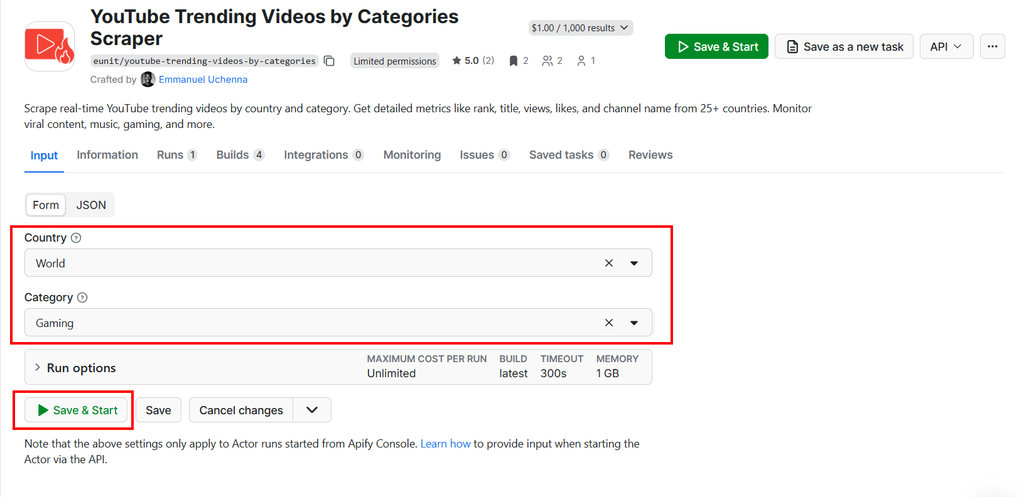
YouTube Trending Videos by Categories Actor input form
- Country: Select your target region from the dropdown menu (e.g.,
United KingdomorUnited States). Leaving this blank or selectingWorldwill retrieve global trends. - Category: choose a specific vertical. For example, if you are analyzing the gaming market, select
Gaming. For a broad overview, you can selectAll.
Step 3: Run the YouTube Trending Videos by Categories Actor
Click the green Start button at the bottom of the page.
The Actor will now spin up a cloud server, navigate to YouTube, extract the data using high-quality residential proxies to avoid detection, and process the results. This usually takes just a few seconds to a minute, depending on the amount of data.
Step 4: Export the data
When the run finishes, you will see a status of "Succeeded." Click on the Export button to view your data. You can download it in various formats depending on your needs:
- Excel / CSV: Perfect for opening in spreadsheets to perform quick pivot tables or charts.
- JSON: Ideal if you are feeding this data into another application or database.
- HTML / XML: Available for legacy integrations.
You now have a clean, structured dataset of the top trending videos, ready for analysis.
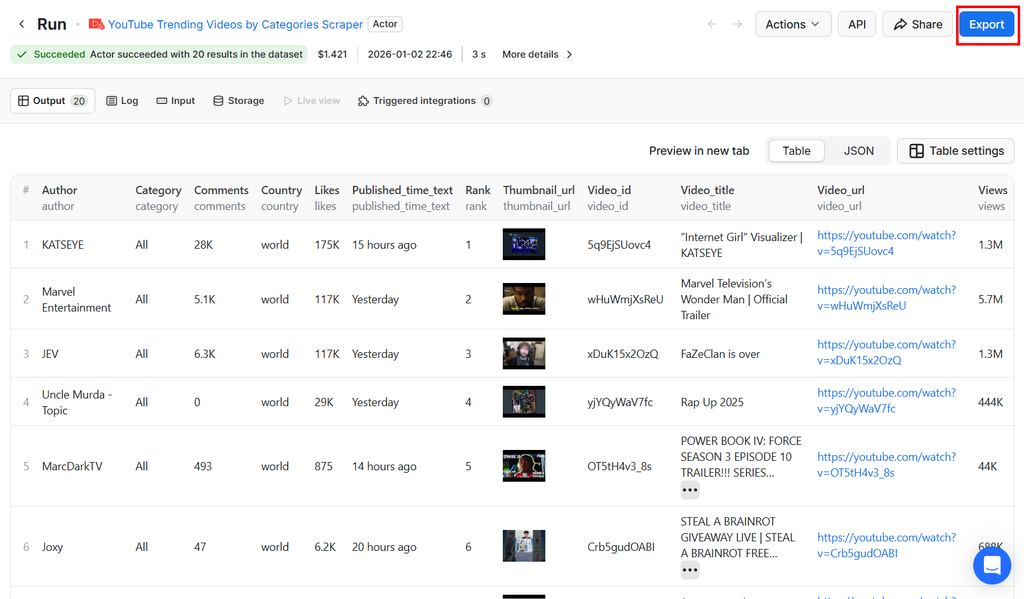
YouTube Trending Videos by Categories Actor output
Zero-to-data walkthrough: How to scrape Popular Channels
Step 1: Access the YouTube Popular Channels Scraper Actor
Navigate to the YouTube Popular Channels Scraper page on the Apify Store. Click the Try for free button. If you don't have an account, you can sign up using your email or GitHub credentials.
Step 2: Configure the channels scraper input
Once you are in the Apify Console, the input form allows you to specify your target audience.
- Country: Select your target region from the dropdown menu (e.g.,
United KingdomorIndia). Leaving this blank or selectingWorldwill fetch global popular channels. - Category: Choose a specific vertical. For example, if you are looking for gaming influencers, select
Gaming. For a broad overview, you can selectAll.
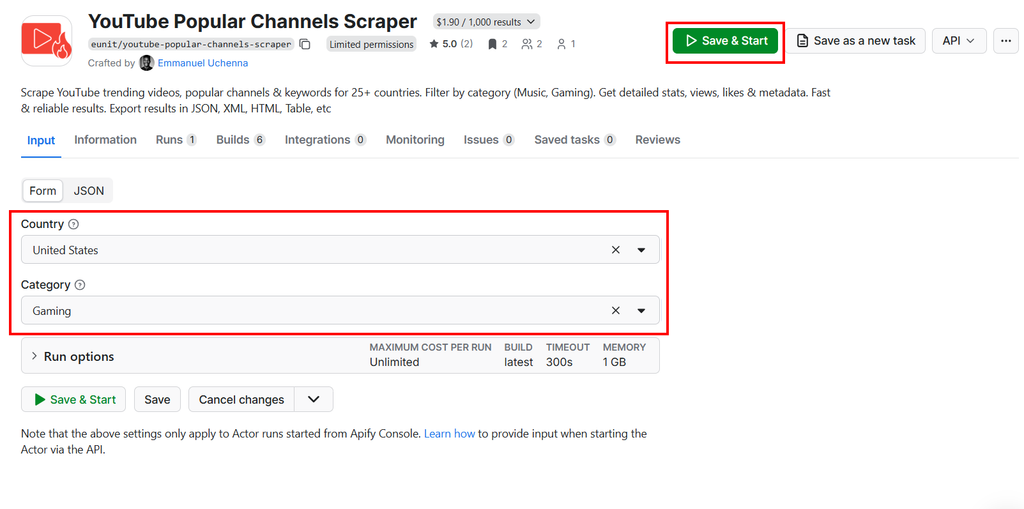
YouTube Popular Channels Scraper input form
Step 3: Run the YouTube Popular Channels Scraper
Click the green Start button at the bottom of the page.
The Actor will now spin up a cloud server, navigate to YouTube, extract the popular channel data using high-quality residential proxies to avoid detection, and process the results. This usually takes just a few seconds to a minute, depending on the amount of data being processed.
Step 4: Export the channels data
When the run finishes, you will see a status of "Succeeded." Click on the Export button to view your data. You can download it in various formats depending on your needs:
- Excel / CSV: Perfect for opening in spreadsheets to perform quick pivot tables or charts.
- JSON: Ideal if you are feeding this data into another application or database.
- HTML / XML: Available for legacy integrations.
You now have a clean, structured dataset of the top popular channels and keywords, ready for analysis.
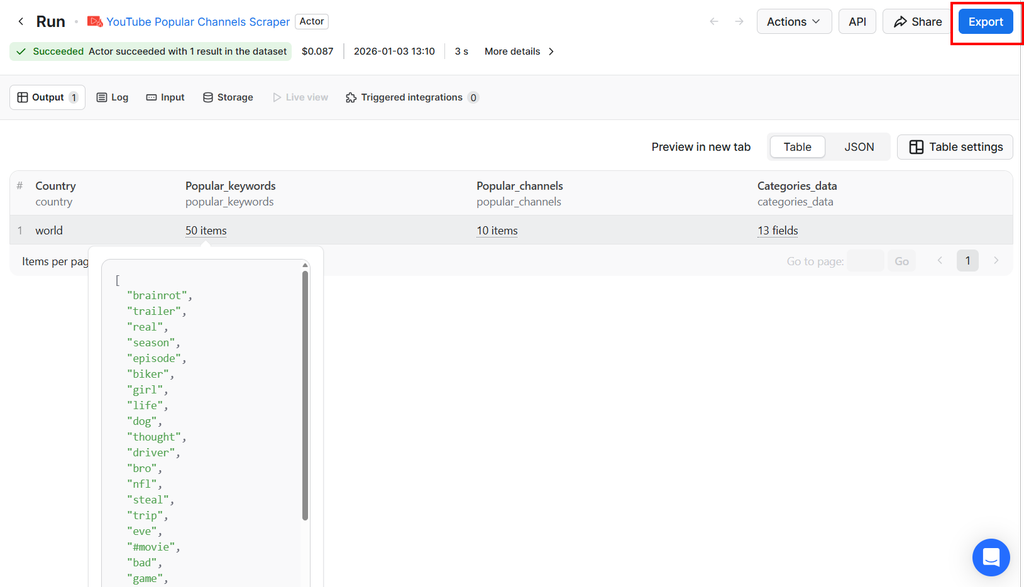
YouTube Popular Channels Scraper output
For developers: Automate with Python
If you are building a custom dashboard or feeding data into a machine learning model, you will want to automate this process. The apify-client for Python makes this incredibly simple.
First, install the client:
pip install apify-client
Now, you can write a simple script to fetch trending gaming videos in the UK or any country of your choosing. You will find your API token in the Settings > API & Integrations section of the Apify Console.
pip install apify-client
Now, you can write a simple script to fetch trending gaming videos in the UK or any country of your choosing. You will need your API token, which you can find in the Settings > API & Integrations section of the Apify Console.
from apify_client import ApifyClient

# 1. Initialize the ApifyClient with your API token
client = ApifyClient("YOUR_API_TOKEN")

# 2. Prepare the Actor input
# We want trending Gaming videos in the UK
run_input = {
    "country": "united-kingdom",
    "category": "gaming",
}

print("🎥 Fetching YouTube gaming trends for UK...")

# 3. Run the Actor
# We use the actor ID: eunit/youtube-trending-videos-by-categories
run = client.actor("eunit/youtube-trending-videos-by-categories").call(run_input=run_input)

# 4. Fetch and print Actor results from the run's dataset
print(f"Stats for run {run['id']}:")

# Iterate through the items in the dataset
for item in client.dataset(run["defaultDatasetId"]).iterate_items():
    # item is a dictionary containing all the scraped data
    rank = item.get('rank', 'N/A')
    title = item.get('video_title', 'Unknown')
    views = item.get('views', '0')
    channel = item.get('channel_name', 'Unknown')

    print(f"#{rank} | {title} by {channel} ({views} views)")
This script can be set to run on a schedule (using Cron or Apify Schedules), ensuring your database is always up-to-date with the latest trends without manual intervention.
Pricing: The pay-per-event advantage
One of the biggest advantages of using these specific Apify Actors is the Pay-Per-Event pricing model.
Traditional SaaS tools often charge hefty monthly subscriptions regardless of how much you use them. With Pay-Per-Event, you are charged a small, fixed amount for each result you successfully scrape.
- Cost-effective: If you only need to scrape trends once a week, you pay pennies. You don't waste money on idle server time.
- Predictable: You can easily calculate costs. If scraping 1,000 videos costs 10X. There are no hidden tiers or surprise overage fees.
- Scale effortlessly: Need to scrape data for 20 different countries simultaneously? You can trigger 20 concurrent runs via the API. The cost per result remains the same, and Apify's infrastructure handles the load.
Legal and ethical considerations
When scraping public data, it is important to operate ethically. These Actors are designed to extract publicly available information—data that any user could see by visiting the website without logging in. They do not access private videos, user passwords, or personal emails.
Wrapping Up
YouTube data is too valuable to be locked behind restrictive APIs or complex coding barriers. Whether you are a solo content creator looking to optimize your next thumbnail or a marketing agency analyzing global trends for a Fortune 500 client, having reliable, scalable access to this data is a game-changer.
By using the YouTube Trending Videos by Categories and YouTube Popular Channels Scraper Actors, you can bypass the technical hurdles and go straight to the insights.
Happy scraping!

Emmanuel Uchenna
@eunit99Hi, I’m Emmanuel Uchenna — a frontend engineer, technical writer, and digital health advocate passionate about building technology that empowers people. With over five years of experience, I specialize in crafting clean, scalable user interfaces with React, Next.js, and modern web tooling, while also translating complex technical ideas into clear, engaging content through articles, documentation, and whitepapers.